

For every quick purchase

flower shop

How BLOEM! Reduces Lines with Scan & Go Payments

Cashierless checkout is gaining ground in busy retail locations.

At train stations, airports, and event venues, consumers expect speed. As a result, retailers are reevaluating the role of payment in the shopping process and the flower shop BLOEM! is no exception.
Bloem Amsterdam Stadionplein

When Every Second Counts in Retail

BLOEM! has locations at places like NS train stations and Schiphol Airport. Many customers at these locations are in a hurry. Fast service is therefore essential to handle peak times and keep the store accessible.

Imagine: you have two minutes left before your train departs and want to quickly pick up a bouquet of flowers. At times like these, it’s not the product but the line that’s the biggest hurdle. Every second counts.

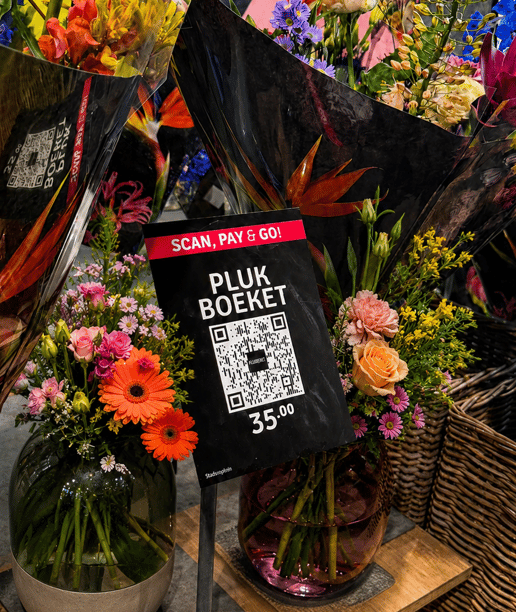
To better handle peak times, BLOEM! opted for a Scan & Go solution that allows customers to check out using a QR code.
Robert Groot Jebbink, Senior Partner Manager, Pay.

"When employees spend less time on transactions, they have more time for customer interaction, inventory management, or providing advice. At the same time, this helps reduce lines during peak times when many customers are trying to check out at once."

qr-payment2

Check out without waiting in line with Scan & Go

How does it work? Customers choose a bouquet, scan a QR code with their smartphone, and pay immediately through their own payment platform. Once the transaction is complete, the employee automatically receives a confirmation via the point-of-sale system. This largely eliminates the need for traditional checkout procedures.

Another advantage is that the payment page opens directly in the browser. Customers don’t need to install a separate app, which keeps the barrier to use low.

Rodrique Vrolijk, owner of BLOEM!

"At our locations, it's all about convenience and speed. Customers are often on the go and want to be served quickly. With QR payments, we simplify the purchasing process without compromising on security or service."

Scan & Go in Practice

No Results

Online Store

1. The customer selects the product

The customer simply selects a bouquet or other product in the store. No employee or dedicated checkout is needed to start the payment process.

Scan

2. Scan the QR code and pay

Scan the QR code with a smartphone and pay instantly via iDEAL, credit card, or a digital wallet. No app required—just use your browser.

advice

3. Immediate confirmation at the register

After payment is made, the point-of-sale system automatically receives a confirmation, allowing the employee to view the purchase immediately.

Personal advice

Fill out the form and find out how we can work together.

Pay. is looking for partners to improve our payment processing and create the best experience for merchants and customers. Do you see opportunities for collaboration? Let us know. Together, we’re stronger.

Robert Groot Jebbink, Senior Partner Manager, Pay.

“Within the Scan & Go solution, consumers can pay using various payment methods, including iDEAL, credit cards, and digital wallets. This can help ensure a smooth checkout process, especially at locations with many international visitors.”

undefined-2-1

From the Point of Payment to the Shopping Process

This trend illustrates how the role of payments is changing. Whereas retailers used to focus primarily on transaction processing, they are now increasingly looking at the impact on customer flow, staffing, and customer convenience.

This makes cashierless checkout appealing for more than just unstaffed stores. Even in traditional retail environments, there is a growing need for payment solutions that keep pace with the store’s rhythm and customer behavior.

Omnichannel payment partner

Why More and More Retailers Are Choosing Pay.

Here's how Pay. helps retailers move forward

Personal advice
One central platform

Manage online and in-person payments, terminals, and reports from a single platform. Fewer separate systems, greater clarity.

Consistent payment experience

Give customers the same payment experience in-store, online, and on the go. All payment flows come together on a single platform.

Better insights

Every payment provides valuable data. This allows you to make decisions based on revenue, payment behavior, and store performance rather than gut feelings.

Ready for Growth

Open new stores, add payment methods, or expand internationally without having to reconfigure your payment infrastructure.

FAQ

Frequently Asked Questions

Need personalized advice?

Contact Us

How can Pay help process large volumes of transactions during sales periods?

Pay is designed to handle high traffic volumes, which is essential during major sales events such as Black Friday or seasonal sales.

Can Pay integrate with my current point-of-sale systems and inventory management software?

Yes, our solution integrates seamlessly with various systems to provide a consistent shopping experience. With our flexible payment options, it fits seamlessly into existing systems right out of the box.

What types of payments does Pay support?

Pay. supports a wide range of payment methods, including payment cards, mobile payments, and online transactions. For a complete overview, visit our overview page.

How does Pay. protect my customers' personal information?

We use advanced security techniques to protect both your customers’ data and your transactions. Pay takes privacy and data protection very seriously, especially when it comes to sensitive payment and personal information. Of course, we also comply with GDPR guidelines and other relevant privacy laws.
achter elke betaling pay-logo