Administration

Automatic reconciliation with Combidesk

With the Combidesk link between Pay, your accounting system and your webshop, every payment flows automatically through to your administration and automatic debiting is possible. As a result, you will never again have to manually transfer data from one system to another. No more error-prone exports, but everything in sync and in one place.

test2
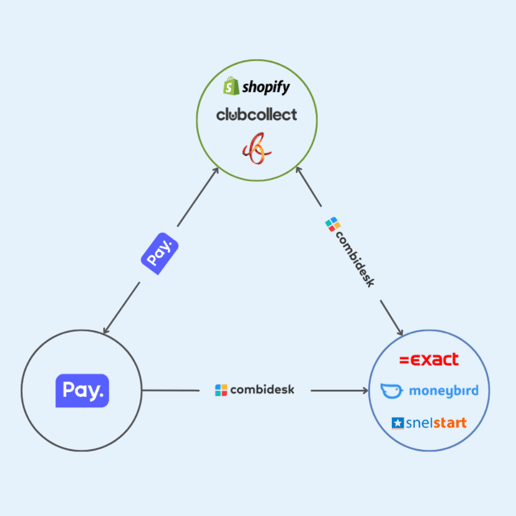
Pay-combidesk triangle

Always overview

One smart link between webshop, payment and accounting

This triangle of Combidesk links between your webshop, Pay. and your accounting program forms the core of an automated payment and administration flow. You link without downloads and always keep an overview.
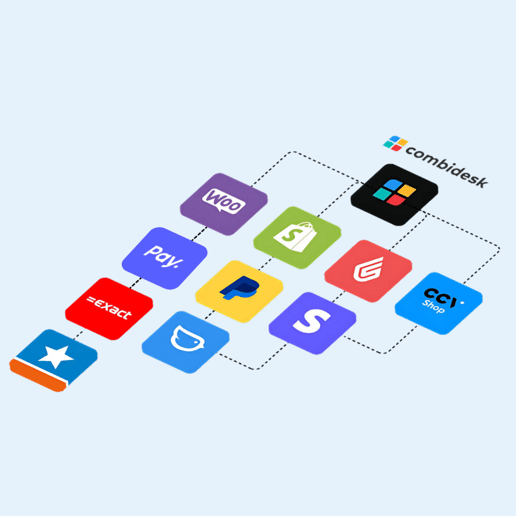
  • Combidesk provides automatic links and seamless data transfer between your systems.
  • Pay. processes payments and provides real-time transaction data.
  • Link with web shops such as Shopify, WooCommerce, CCV Shop, and more.
  • Link with accounting software such as Exact Online, Moneybird, Twinfield and AFAS.
Combidesk flow with Pay.logo

Efficiency

Work smarter

  • Payment data is automatically forwarded to your administration. No separate exports, no manual input.
  • Processed transactions appear directly in your accounting records and are automatically reconciled. As a result, your figures are always current.
  • The link works instantly. No technical implementation or download required.
  • Easily filter by revenue groups and/or sales locations.

Webshops

Webshop linked. Payment dates arranged.

With Combidesk, you link your webshop and your administration to Pay in just a few clicks. From order to booking: everything runs automatically, without manual work.

Accounting / ERP

Directly processed in your accounting system

The link between Pay, your accounting or ERP system and your website allows for direct throughput of payment data. Invoices, payments and debits are automatically processed in Exact, Moneybird, Twinfield or AFAS. This saves time, prevents errors and gives you real-time insight into your administration.

mbway content page

Implementation

Ready in three steps

Combidesk provides ready-made links, so you don't have to build anything yourself. If you're a little handy, installation is a piece of cake. You activate the link with the press of a button. This saves time and technical effort. Still can't figure it out? No problem, Combidesk can also install the link for you.

  • Make sure you have an active Pay. account. Don't have an account yet? Request it easily through our website.
  • Check the setup of your systems. Check that both Pay. and your accounting software (such as Exact Online) are set up correctly.
  • Activate and configure the link. Via Combidesk, you install the link with the press of a button. Then you adjust the settings to your needs.

Support

Frequently Asked Questions

Need personal assistance?

Get in touch

How often is data synchronized?

The data is always up-to-date and the link is fully automatically synchronized every day. You don't have to do anything for this.

How can I install a Pay. link from Combidesk?

Need help? Combidesk can install the link for you. For this we charge a one-time installation fee. If you decide not to use the link after all, this will be refunded.

Do I need to enter payment information to install a Pay. link?

You can try Combidesk's Pay. links for free and without obligation for 30 days. Do you decide to continue using the link after the trial period? Then you will receive timely information on how to order the link.

What is the notice period for the Pay. links?

The pairings have a notice period of one month. So you are not stuck with long terms.


What are the benefits of integration with Pay?

Because of the collaboration between Combidesk and Pay. the lines of communication are short. This means that together we can ensure that everything is seamlessly integrated. In addition to the advantage of being able to manage everything compactly on one device, this cooperation allows you to enjoy fixed and competitive rates for all your payment traffic.

achter elke betaling pay-logo