

Of course, you need to have the necessary technical knowledge to make the connection with our system. Fortunately, we have a very comprehensive sample code including instructions that you can download from our Admin Panel.
To make a connection you use the APIs of Pay. Each API has extensive documentation and can be tested live via our API test suite. In short: for the average developer the integration is quick and easy to achieve.
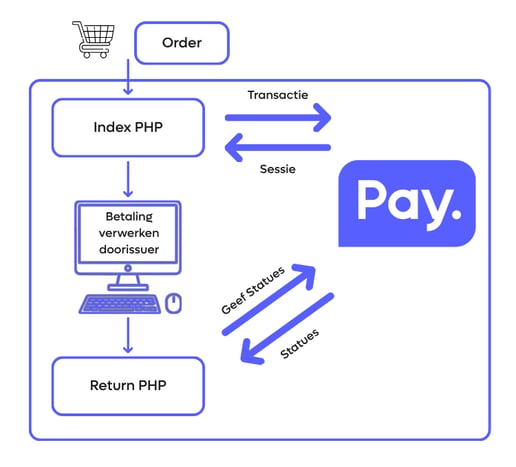
From selecting a payment method to completing the payment; this is how your customer completes the process.
On your payment screen (index PHP in the image) you use the API Transaction: getServices to retrieve the payment methods you selected in the Admin Panel.
The moment your customer clicks on a payment method, the API Transaction: start is called and we return an issuer URL. This is the URL of the page the customer needs to be sent to, for example the iDEAL page of Rabobank.
Your customer then makes a payment and is redirected to your thank you/finish page (return PHP in the image).
There you retrieve the status of the payment via a unique transaction ID. If the payment is not successful, you can for example send the customer back to your payment screen. If the payment is successful, you can for example update your database, display a thank you message, send a confirmation email and deliver the order.